McAfee uncovers NoVoice rootkit in 50+ Google Play apps. Uses steganography, 22 exploits, hijacks WhatsApp. Factory reset won't save you.
Operation NoVoice: The Android Rootkit That Survives Factory Reset and Hijacks WhatsApp
More than 2.3 million Android devices have been compromised by a sophisticated rootkit that hid inside 50+ legitimate-looking Google Play apps, exploits 22 known vulnerabilities to gain kernel-level access, uses steganography to conceal its payload inside ordinary PNG images, and persists through factory resets. Its primary mission: silently cloning victims' WhatsApp sessions and handing them to attackers.
McAfee's Mobile Research Team, operating as part of Google's App Defense Alliance, uncovered the campaign they track as Operation NoVoice -- one of the most technically advanced Android malware operations discovered in recent years. The affected apps have since been removed from Google Play, but the damage to millions of devices running outdated Android versions cannot be undone with a simple reset.
Here is everything defenders and users need to know.
How It Started: 50+ Apps, Zero Suspicion
The NoVoice campaign was distributed through more than 50 applications on Google Play, all disguised as everyday utility software: phone cleaners, image gallery tools, and casual games. These apps required no suspicious permissions and delivered the functionality they advertised. Users had no reason to doubt them.
Collectively, the malicious apps accumulated at least 2.3 million downloads before McAfee reported them and Google removed them from the store. The apps are no longer available for download, but devices that installed them and lacked adequate security patches remain compromised.
What made NoVoice particularly dangerous was its patience. The apps functioned normally on the surface while silently profiling each device and reaching out to command-and-control (C2) infrastructure in the background, waiting for instructions to begin the real attack.
The Steganography Trick: Malware Hidden Inside Images
NoVoice employed an elegant concealment technique that allowed its malicious payload to pass undetected through Google Play's security scanning and most third-party antivirus engines.
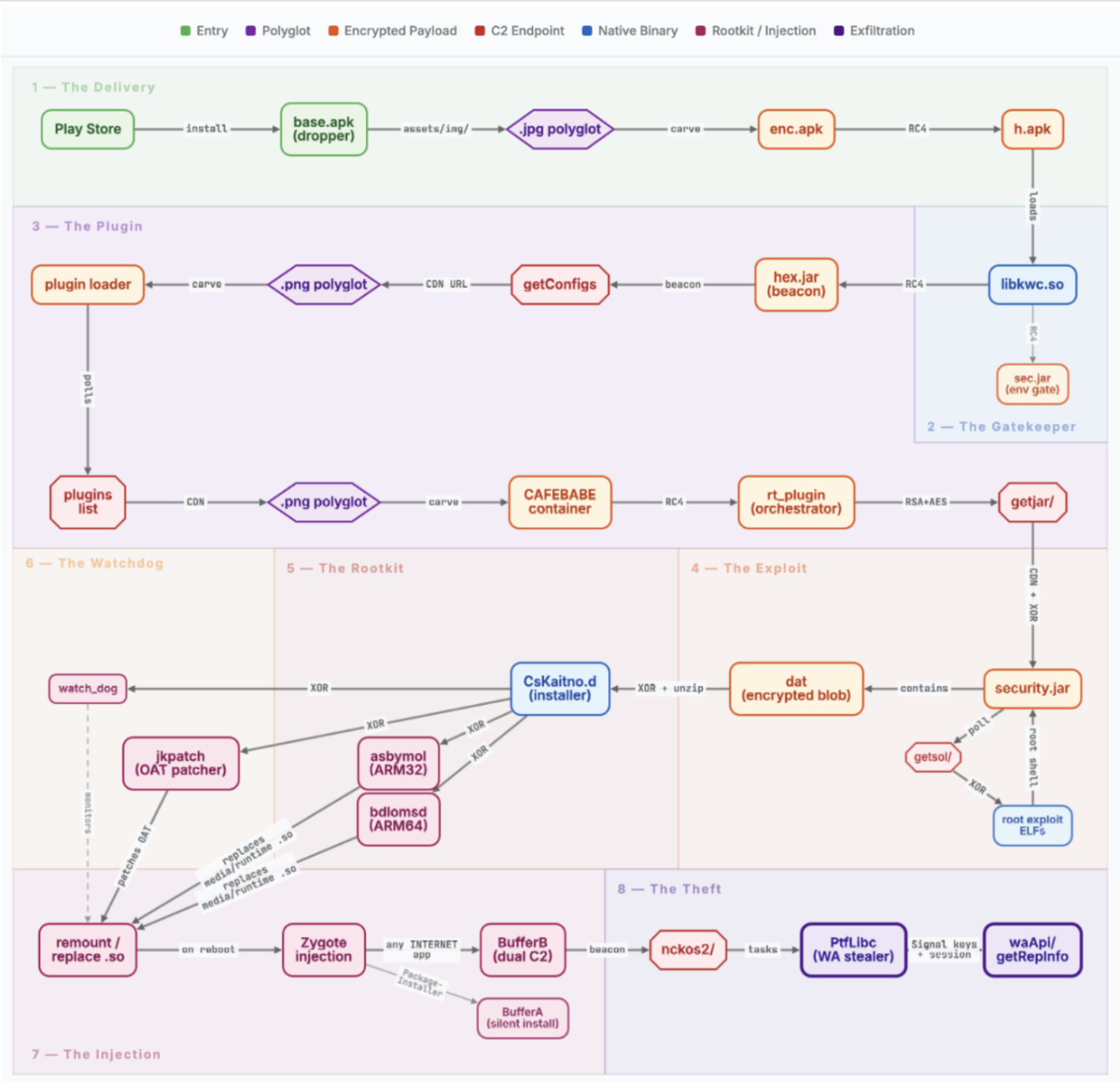
The attackers embedded an encrypted payload (enc.apk) inside an ordinary PNG image file using steganography. The malicious data was appended after the PNG file's IEND marker -- the standard end-of-file indicator for PNG images -- and prefixed with the magic value CAFEBABE. Because image viewers and standard security scanners stop reading a PNG file at the IEND marker, the hidden payload was effectively invisible to automated analysis.
Once on the device, the malware extracted this concealed payload as h.apk, loaded it directly into system memory, and immediately wiped all intermediate files from disk to eliminate forensic traces. This approach meant that even if a security researcher examined the installed app's file structure, the extracted malicious component would leave no obvious artifacts.
The threat actors further obfuscated their work by hiding malicious components inside a package named com.facebook.utils, mixing their code with legitimate Facebook SDK classes. The malicious code was injected into the app's Facebook SDK initialization path, ensuring it executed silently during normal app startup without triggering additional permission dialogs or user-visible behavior.
15 Checks Before Attacking: Anti-Analysis Defenses
Before deploying any exploit, NoVoice ran an extensive series of 15 verification checks designed to ensure it was operating on a real victim device rather than a security researcher's analysis environment. These checks scanned for:
- Emulator environments commonly used by malware analysts
- Active debuggers attached to the process
- VPN and proxy connections that might indicate traffic interception
- Rooting hooks from frameworks like Magisk or Xposed
- GPS geofencing to exclude specific geographic regions
Notably, the malware was configured to avoid infecting devices physically located in Beijing and Shenzhen, China. If location permissions were unavailable, the infection would proceed regardless -- suggesting the exclusion was a deliberate operational decision by the threat actors rather than a technical limitation.
22 Exploits, One Goal: Root Access
The core of NoVoice's capability rested on an arsenal of 22 distinct exploits identified by McAfee researchers. All of these exploits targeted known Android vulnerabilities that were patched between 2016 and 2021. While this means they cannot compromise up-to-date devices, millions of phones worldwide -- and a significant share of devices in Ukraine -- still run Android versions with security patch levels that predate these fixes.
The malware's C2 server played an active role in exploit selection. After profiling each target device (collecting hardware details, kernel version, Android version, security patch level, installed apps, and existing root status), the server selected and delivered the optimal exploit chain for that specific hardware and software combination. The malware polled the C2 server every 60 seconds for updated payloads.
A Three-Stage Kernel Attack
McAfee's deep analysis of one exploit chain revealed a sophisticated three-stage kernel attack:
- Stage 1 -- Kernel Read Access: An IPv6 use-after-free vulnerability was exploited to gain the ability to read arbitrary kernel memory.
- Stage 2 -- Kernel Read/Write Access: A Mali GPU driver vulnerability was leveraged to escalate from read-only to full read/write access to kernel memory.
- Stage 3 -- Full Compromise: With unrestricted kernel memory access, the exploit patched process credentials and disabled SELinux protections entirely, granting the malware unrestricted root access to the device.
Other exploits in the arsenal targeted additional use-after-free kernel bugs, Mali GPU driver flaws, and IPv6 handling vulnerabilities across various Android kernel versions.
The Unkillable Rootkit: How NoVoice Achieves Persistence
Once root access was obtained, the rootkit installer component -- identified by researchers as CsKaitno.d -- was decrypted from an embedded resource and written to disk. From this point, NoVoice established a multi-layered persistence architecture that made removal extraordinarily difficult.
System Library Replacement
The rootkit replaced critical Android system libraries, specifically libandroid_runtime.so and libmedia_jni.so, with malicious wrapper binaries. These hooked wrappers intercepted system function calls and redirected execution to attacker-controlled code. Because libandroid_runtime.so is loaded by every Android application at launch, this single modification meant that every app on the device ran attacker code the moment it started.
Recovery Scripts and Crash Handler Hijacking
NoVoice installed recovery scripts on the system partition and replaced the Android system crash handler with a rootkit loader. If the device crashed and rebooted, the compromised crash handler would reload the rootkit before any other system component could interfere.
Fallback Payloads
Additional malicious payloads were stored on the system partition -- a partition that is not touched during a standard factory reset. This is the critical reason why factory reset cannot remove NoVoice. The malicious code lives in a location that the reset process considers part of the operating system itself.
Watchdog Daemon
A persistent watchdog daemon ran every 60 seconds, checking the rootkit's integrity across all persistence layers. If any component was found missing or damaged, the watchdog automatically reinstalled it. If integrity checks failed entirely, the daemon forced a device reboot, causing the rootkit to reload through the compromised crash handler or recovery scripts.
The Silent Audio Trick
The campaign's name, "NoVoice," derives from a specific technical detail: the malware embedded a silent audio resource file (R.raw.novioce -- note the intentional misspelling) in one of its later-stage payloads. This zero-volume audio file was played continuously to keep an Android foreground service alive, exploiting the operating system's media playback exemption that prevents the system from killing services actively playing audio. The malware maintained persistent background execution while appearing completely silent to the user.
WhatsApp Session Hijacking: The Real Payload
While the NoVoice framework was architecturally designed to accept and execute any task delivered by the C2 server, the only confirmed theft payload recovered by McAfee researchers was focused on a single target: WhatsApp.
When WhatsApp was launched on an infected device, the rootkit's injected code -- running within every application process thanks to the compromised system library -- detected the WhatsApp launch and extracted:
- Encryption databases containing message history
- Signal protocol keys used for end-to-end encryption
- Account identifiers including the victim's phone number
- Google Drive backup details for cloud-stored message archives
This data was exfiltrated to the C2 server, enabling attackers to clone the victim's WhatsApp session on an attacker-controlled device. With a cloned session, an attacker could read all incoming and outgoing messages, impersonate the victim in conversations, access group chats and shared media, and potentially pivot to compromise the victim's contacts through social engineering.
The fact that only a WhatsApp-targeting payload was recovered does not mean this was the operation's sole capability. The modular framework was built to accept any objective at any time, making NoVoice a flexible platform for surveillance, data theft, or further exploitation.
Connection to the Triada Malware Family
Security researchers have identified strong technical similarities between NoVoice and the notorious Triada malware family, a well-documented Android rootkit lineage that has been active for years. Several specific indicators link the two:
- NoVoice sets the system property
os.config.ppgl.statusto mark a device as compromised. This is a known indicator of compromise forAndroid.Triada.231, a Triada variant that uses the identical property to track installation state. - Both NoVoice and Triada persist by replacing
libandroid_runtime.soand hooking system functions so that every app runs attacker code at launch. - The overall persistence architecture -- system library replacement, watchdog processes, recovery script installation -- follows patterns established by earlier Triada variants.
Whether NoVoice represents an evolution of Triada, a fork by a different group using Triada's techniques, or an entirely separate operation that converged on similar methods remains an open question for the threat intelligence community.
Implications for Ukrainian Users
This threat carries particular significance for Ukrainian users, and CyberPeople considers it important to frame the risk within Ukraine's specific context.
Older Devices and the Vulnerability Window
Ukraine's smartphone market is heavily skewed toward budget and mid-range Android devices. Xiaomi, Redmi, and Samsung dominate, with many users purchasing affordable models or continuing to use older devices. StatCounter data for Ukraine shows that while the majority of Android users have migrated to Android 11 or newer, a meaningful segment -- estimated at over 15% of Ukrainian Android users -- remains on Android 10 or older versions. Many of these devices carry security patch levels that predate the May 2021 threshold required for protection against NoVoice exploits.
The economic pressures of the ongoing war have further extended device lifecycles. Upgrading to a newer smartphone is not always a priority when more fundamental needs take precedence. This creates a structurally larger attack surface in Ukraine compared to Western European markets where device refresh cycles are shorter.
Wartime OPSEC and WhatsApp Session Cloning
WhatsApp is used in Ukraine for personal communication and, in some cases, for coordination that touches on sensitive wartime matters. The ability to silently clone a WhatsApp session represents a serious operational security threat:
- Intelligence gathering: An adversary with access to cloned WhatsApp sessions could monitor personal communications of military personnel, volunteers, government employees, or journalists.
- Impersonation and social engineering: With a cloned session, an attacker can impersonate the victim to their contacts, potentially extracting information or spreading disinformation.
- Network mapping: Access to group chats reveals organizational structures, contact networks, and communication patterns that are valuable for intelligence purposes.
While there is no public evidence linking Operation NoVoice to any nation-state actor, the capability it provides -- silent, persistent WhatsApp surveillance that survives factory reset -- aligns precisely with the kind of tool that intelligence services would find valuable in a conflict context.
Messaging App Considerations
Ukrainian users handling sensitive communications should evaluate their messaging platform choices carefully. Signal offers stronger architectural protections against session cloning, and Telegram's secret chats provide device-bound encryption that cannot be replicated on another device. Standard Telegram cloud chats, however, share some of the same risks as WhatsApp if device-level compromise occurs. No messaging app can protect its users if the underlying operating system has been rootkitted.
Known Indicators of Compromise
While McAfee has not published a complete list of all 50+ malicious app names or C2 infrastructure details, the following indicators have been disclosed:
Technical Indicators:
- Presence of CsKaitno.d binary on the device
- Modified libandroid_runtime.so or libmedia_jni.so system libraries
- System property os.config.ppgl.status set on the device
- Package containing com.facebook.utils with code not matching legitimate Facebook SDK
- Silent audio resource file R.raw.novioce in installed applications
- Unexplained foreground service playing zero-volume audio
Behavioral Indicators: - Unexpected battery drain from background services - WhatsApp behaving unusually (sessions being terminated, unexpected login notifications) - Device rebooting without user action - Security applications being terminated or disabled
App Categories Used as Carriers: - Phone cleaners and optimization tools - Image gallery and photo management apps - Casual games
All identified malicious apps have been removed from Google Play. Google Play Protect will automatically flag and remove known NoVoice-carrying apps from devices where it is enabled.
How to Check If You Are Affected
Step 1: Check Your Security Patch Level
Open Settings > About Phone > Android Security Patch Level (the exact path varies by manufacturer). If your security patch level is May 2021 or later, your device is not vulnerable to the exploits used by NoVoice. You can stop here.
Step 2: Review Installed Apps
If your patch level predates May 2021, review your installed applications. Uninstall any utility apps (cleaners, gallery tools, casual games) that you do not recognize, that have no reviews, or that were published by unknown developers. Pay particular attention to apps installed before April 2026.
Step 3: Check for Signs of Compromise
Look for the behavioral indicators listed above: unexplained battery drain, WhatsApp session anomalies, spontaneous reboots, or disabled security tools. On a rooted or developer-enabled device, check for the os.config.ppgl.status system property.
Step 4: If Compromised -- Firmware Reflash Is Required
A factory reset will not remove NoVoice. The rootkit resides on the system partition, which is preserved during a factory reset. The only reliable remediation is a complete firmware reflash using the manufacturer's official firmware image. This process varies by device manufacturer:
- Samsung: Use Samsung's Odin tool with official firmware from SamMobile or Samsung's servers
- Xiaomi/Redmi: Use MiFlash with official ROM from Xiaomi's website
- Other manufacturers: Consult the manufacturer's support documentation for firmware reinstallation procedures
After reflashing, set up the device as new rather than restoring from a backup that may have been created while the device was compromised.
Protection Recommendations
For Individual Users
- Keep your device updated. Ensure your Android security patch level is current. Devices with patches from May 2021 or later are protected against all known NoVoice exploits.
- Enable Google Play Protect. Verify it is active in Google Play Store settings. It provides automatic scanning and removal of known malicious apps.
- Be skeptical of utility apps. Phone cleaners, battery optimizers, and similar "maintenance" tools are a perennial favorite for malware distribution. Modern Android versions handle these tasks natively.
- Verify app publishers. Before installing, check the developer's track record, number of apps published, review authenticity, and how long they have been active on Google Play.
- Consider device upgrade. If your device no longer receives security updates, it is a liability. Budget Android devices from Xiaomi, Samsung, and others that receive regular patches are available at reasonable price points.
For Organizations
- Implement Mobile Device Management (MDM). Enforce minimum security patch levels across all corporate and BYOD devices accessing organizational resources.
- Enforce app whitelisting. Restrict which applications can be installed on devices that access organizational data or communications.
- Conduct device compliance checks. Regularly verify that employee devices meet minimum security standards before granting access to sensitive systems.
- Establish secure communication protocols. Define which messaging platforms are approved for different sensitivity levels of communication. Ensure personnel understand that device-level compromise defeats application-level encryption.
- Plan for compromised device scenarios. Have procedures in place for firmware reflashing and credential rotation when device compromise is suspected.
The Bigger Picture
Operation NoVoice is a reminder that the Android ecosystem's fragmentation problem is not merely an inconvenience -- it is a security crisis. The exploits used by NoVoice were patched years ago, yet millions of devices remain vulnerable because manufacturers stopped providing updates or users did not apply them.
For cybersecurity professionals, the technical sophistication of NoVoice's persistence mechanisms -- the multi-layered approach combining system library replacement, watchdog daemons, recovery script hijacking, and crash handler manipulation -- represents a maturation of mobile rootkit techniques that will likely be replicated and refined by other threat actors.
For Ukrainian users specifically, this campaign underscores the importance of treating mobile device security as a component of personal and organizational operational security. In a context where adversaries are actively seeking intelligence advantages, a compromised smartphone is not just a privacy violation -- it is a potential security breach with real-world consequences.
The apps are gone from Google Play. The exploits are patched in modern Android versions. But for the 2.3 million devices already infected, the rootkit tells no tales -- and a factory reset will not silence it.
This analysis is based on research published by McAfee's Mobile Research Team and reporting from BleepingComputer, CyberInsider, Cybersecurity News, and other sources. CyberPeople will update this article as additional technical details, IOCs, or attribution information become available.
Sources: - McAfee Labs -- Operation NoVoice: Rootkit Tells No Tales - McAfee -- Operation NoVoice: Android Malware Found in 50+ Apps - BleepingComputer -- NoVoice Android malware on Google Play infected 2.3 million devices - CyberInsider -- Android rootkit NoVoice infects 2.3 million devices - Cybersecurity News -- NoVoice on Google Play with 22 Exploits